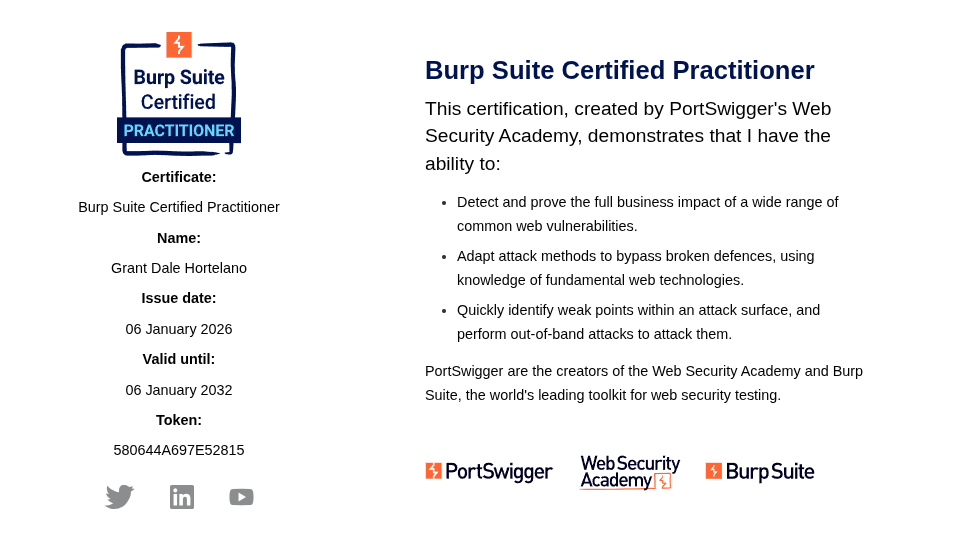
After a weeks of preparation, countless PortSwigger labs, and more caffeine than I’d like to admit, I finally passed the Burp Suite Certified Practitioner (BSCP) exam. Here’s everything you need to know about the exam, my preparation strategy, and what to expect on exam day.
Why the BSCP?
The BSCP is one of the most respected practical certifications in web application security. Unlike multiple-choice exams that test memorization, this one throws you into a live environment where you have to actually exploit vulnerabilities. No guessing your way through. You either pop the shell or you don’t.
My Background Going In
I came into this with about 3+ years of experience in CTFs and lab environments, but no formal security training. Everything I knew came from hands-on practice, online resources, and an unhealthy obsession with breaking things.
The Exam Structure
The BSCP gives you 4 hours to compromise two web applications. Each application has three stages:
- Stage 1: Gain access to a low-privileged user account
- Stage 2: Escalate to an administrator account
- Stage 3: Read the contents of
/home/carlos/secretusing your admin access
Stage 1: Initial Access
Stage 1 is all about authentication bypasses and gaining that first foothold. The vulnerabilities you’ll encounter here typically include:
- Cross-site scripting (XSS)
- Authentication logic flaws
- HTTP Request Smuggling
- Web cache poisoning
- Access control vulnerabilities
- Password reset poisoning
- HTTP Host Header attacks
- Brute force with subtle twists
My approach: I always started with passive reconnaissance. Map the application, identify all input points, and understand the authentication flow before firing off payloads. Burp’s site map and target scope features were invaluable here.
Stage 2: Privilege Escalation
Once you’re in as a regular user, Stage 2 requires escalating to admin. This is where things get interesting:
- Access control vulnerabilities (IDOR, forced browsing)
- CSRF
- Stored XSS
- SQL injection (rare)
- HTTP request smuggling
- CORS misconfigurations
The key insight: the exam already tells you what vulnerability category you need to exploit. You don’t need to guess or hunt for hidden endpoints. Your job is to identify where the vulnerability is and how to exploit it to escalate to admin.
Stage 3: The Final Boss
With admin access, you need to read /home/carlos/secret. This usually involves:
- Server-Side Template Injection (SSTI)
- OS command injection
- Path traversal
- XXE (XML External Entity)
- Insecure deserialization
Stage 3 separates those who understand exploitation from those who just know vulnerability names. You need to chain your admin access with a server-side vulnerability to actually read files from the system.
My Preparation Strategy
1. Complete the PortSwigger Web Security Academy
This is non-negotiable. I worked through every single lab, focusing especially on:
- All SQL injection labs (including blind variants)
- XSS (reflected, stored, and DOM-based)
- Authentication vulnerabilities
- Access control
- SSRF
- XXE
- SSTI
- OS command injection
- HTTP request smuggling
Don’t just solve them. Understand why the vulnerability exists and how the fix would work.
2. Build Your Own Cheat Sheets
I created comprehensive reference notes for each vulnerability category. When you’re under time pressure in the exam, you don’t want to be googling basic payload syntax. Have your go-to payloads ready.
3. Know What to Expect at Each Stage
I didn’t develop some fancy methodology with checklists. I just learned what vulnerabilities typically appear at each stage. For example, Stage 1 is about hijacking a low-privileged user’s session so you’ll see XSS and web cache poisoning, not SQLi.
Once you do enough labs, you start recognizing patterns. If I saw tracking.js I would already assume web cache poisoning. If there’s a comment feature, probably stored XSS. Password reset page with a token? Check if the token is tied to the session.
This pattern recognition is what saves you time. You’re not testing everything blindly. You see a feature and your brain already knows the likely vulnerability.
4. Practice Under Time Pressure
The 4-hour limit is real. I practiced doing mystery labs (random vulnerability types) with a timer running. This builds the speed and pattern recognition you need.
5. Master Burp Suite
Know your tool inside and out:
- Intruder for automated testing
- Repeater for manual request manipulation
- Collaborator for out-of-band testing
- Scanner (yes, you can use it in the exam)
- Extensions that speed up your workflow
Before doing anything, add both applications to your scope and filter Burp to only show traffic from those two applications. This removes unnecessary noise like Burp’s own traffic from your proxy history.
Also, in your proxy history filters, make sure you DO NOT filter out JavaScript and images. You want to see these. Why? JavaScript files might contain DOM XSS sinks. Images might reveal file inclusion vulnerabilities with parameters like ?file=. I’ve seen people miss vulnerabilities because they filtered these out.
I Crushed It in 2 Hours
Yeah, you read that right. The exam gives you 4 hours, but I finished both applications in just under 2 hours. But it wasn’t all smooth sailing.
The Reality: I Got Stuck
Let me be honest about what actually happened. On App 1, Stage 1, I hit a wall. I knew what the vulnerability was. I could see where it was. But no matter what payload I tried, I couldn’t get it to work.
I spent almost an hour on this single stage. An hour. On what should have been the “easy” part.
But while I was stuck, I didn’t waste that time completely. I was mapping the application and testing everything. On the password reset page I noticed some interesting behavior that made me think about CSRF. I noted that down so if I got to Stage 2, that’s what I would focus on. And I was right. That’s exactly what I exploited on App 1 Stage 2 to get admin.
The Pivot That Saved Me
After burning an hour, I made a decision: skip App 1 entirely and move to App 2.
I solved all three stages of App 2 in about 20-30 minutes. All three stages were easy.
Once I finished App 2, I locked back in on App 1 with fresh eyes.
The hard thing for me was Stage 1. The initial access. The part everyone says is supposed to be the warmup.
So if you’re reading this and thinking “I’ll breeze through Stage 1 and struggle on Stage 3” - maybe. Or maybe, like me, you’ll find that the “easy” stage is your personal nightmare.
The lesson: Don’t let one stage eat all your time. Move on and come back.
My Personal Tips
Use Burp Scanner Strategically
This was a game-changer for me. Burp Pro has features that most people underutilize:
When you have lots of parameters and don't know which one is vulnerable: Right-click the request and select “Active scan selected messages”. Let Burp do the heavy lifting of testing every parameter while you continue manual enumeration elsewhere. This is a massive time saver when you’re staring at a request with 10+ parameters.
When you have a single parameter but don't know the vulnerability type: Highlight just that parameter, right-click, and use “Scan selected insertion points”. This focuses Burp’s scanner on that specific parameter and tests it against all vulnerability types. Much faster than manually testing SQLi, then XSS, then SSTI, etc.
Other Quick Tips
-
Read the instructions carefully. The exam page gives hints about what vulnerability categories are in play.
-
Don’t panic. If one application seems impossible, switch to the other. Fresh eyes help.
-
Trust your approach. Systematic enumeration beats random payload spraying every time.
-
Document as you go. If you find something interesting but don’t immediately exploit it, note it down.
What I Wish I Knew Before
-
HTTP request smuggling is more common than you’d think. Make sure you’re comfortable with both CL.TE and TE.CL variants.
-
DOM XSS requires a different mindset. Understand sources, sinks, and how data flows through JavaScript.
-
Blind vulnerabilities are everywhere. Get comfortable with time-based and out-of-band techniques.
-
The exam tests chaining. Rarely is it a single vulnerability. You often need to combine techniques.
Final Thoughts
Passing the BSCP validated something I’d been building toward for years. It’s not an easy exam, and it shouldn’t be. The difficulty is what makes it meaningful.
If you’re preparing for the BSCP, my advice is simple: do the labs, build your pattern recognition, and trust the process. The skills you develop aren’t just for passing an exam. They’re the same skills you’ll use in real-world penetration testing.
Now if you’ll excuse me, I have some more things to break.
Useful Resources
- https://bscp.guide/
- https://github.com/botesjuan/Burp-Suite-Certified-Practitioner-Exam-Study
- https://github.com/swisskyrepo/PayloadsAllTheThings
Got questions about BSCP prep? Feel free to reach out. Happy hacking.